

Table of Contents
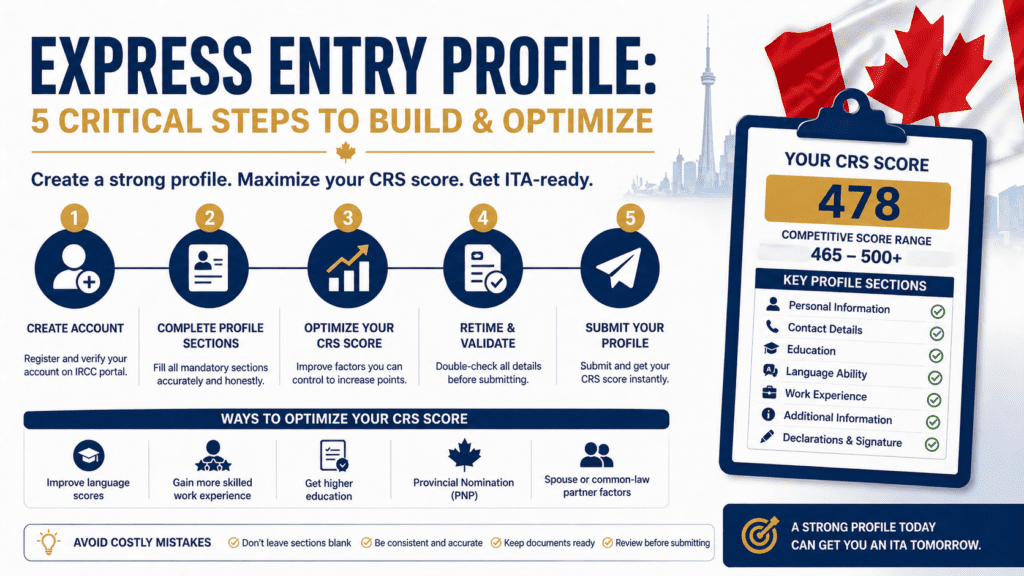
Your express entry profile is the foundation of your entire Canadian permanent residence application. Every piece of information you enter – your work experience, language scores, education, and personal details – feeds directly into your Comprehensive Ranking System CRS score, which determines when and whether you receive an Invitation to Apply. A profile built carelessly or inaccurately does not just hurt your score. It creates inconsistencies that IRCC officers will scrutinize when they review your full application.
This article walks through the five critical steps to build a complete, accurate, and optimized express entry profile.
What Your Express Entry Profile Actually Does
Your express entry profile is not an application. It is a declaration of your qualifications that IRCC uses to calculate your CRS score and rank you against other candidates in the pool. When a draw occurs, IRCC issues ITAs to all candidates above the cutoff score for that draw. Your profile must be in the pool and your score must be above the cutoff for you to receive an invitation.
This means two things matter: accuracy and score optimization. Accuracy means every field reflects your actual qualifications – not an inflated version designed to improve your score. Misrepresentation in your express entry profile is grounds for refusal and a five-year ban from Canadian immigration. Score optimization means understanding which factors contribute the most points and ensuring every eligible point is claimed correctly.
For a full breakdown of how CRS scores are calculated and what drives the point totals, the CRS score calculator guide covers each factor in detail. For strategies to improve your score before submitting your profile, the how to improve CRS score guide covers the highest-return optimization approaches.
Step 1 – Gather All Required Documents Before You Start
The most common express entry profile mistake is starting the profile before all supporting documents are ready. The profile itself does not require document uploads – those come after you receive an ITA. But the information you enter must be consistent with the documents you will eventually submit.
Before you open the IRCC portal, have the following ready: your valid passport, your language test results with exact band scores, your ECA report if you are a foreign-educated FSWP applicant, your complete employment history with dates, employer names, job titles, and NOC codes, and your proof of funds figures from your bank.
If any of these are not yet finalized – your language results are pending, or your ECA is being processed – wait until they are complete. Entering estimated or placeholder information in your express entry profile creates inconsistencies that are difficult to correct later and may raise questions at the application stage.
Step 2 – Enter Your Personal and Background Information Accurately
The first section of your express entry profile covers personal information: your name exactly as it appears on your passport, date of birth, country of citizenship, country of residence, and marital status. This information must match your passport exactly – any discrepancy between your profile and your eventual application documents triggers a flag.
Marital status affects your CRS score if your spouse or common-law partner has language scores or education credentials that contribute points under the spousal factor. Enter your marital status accurately and complete the spouse information section fully if applicable.
Your country of residence affects which streams you may be eligible for. Applicants currently living and working in Canada are eligible for the Canadian Experience Class CEC stream, which has different requirements than streams for applicants applying from outside Canada.
Step 3 – Enter Work Experience With Exact NOC Codes and Dates
Your work experience section is the most scrutinized component of your express entry profile. Every position you claim must have a corresponding NOC code that accurately reflects the duties you performed – not just your job title.
For each position, enter the exact start and end dates, the hours per week worked, the employer name, and the NOC code. IRCC defines full-time work as at least 30 hours per week. If you worked part-time, the hours must total at least 1,560 to count as one year of full-time equivalent experience.
The NOC code you select must match the lead statement and main duties described in the official NOC description. Before entering any NOC code in your express entry profile, read the full NOC description and verify that your actual job duties match. If multiple NOC codes seem applicable, choose the one whose main duties section most closely matches what you actually did day to day.
Gaps in your work history are acceptable and do not require explanation at the profile stage. However, they will require explanation at the application stage, so maintain consistent records of any periods of unemployment, self-employment, or study.
Step 4 – Enter Language Scores Exactly as They Appear on Your Results
Language scores are one of the highest CRS point contributors in your express entry profile, and they must be entered exactly as they appear on your official test results – not rounded up, not estimated, and not based on a practice test.
Enter your scores for all four abilities: reading, writing, listening, and speaking. The profile converts your raw scores to Canadian Language Benchmark CLB equivalents automatically. Double-check the CLB conversion shown in your profile against the official CLB conversion tables for your test type – errors in this conversion affect your CRS score calculation.
If your spouse or common-law partner also has language test results, enter their scores in the spousal section. Spousal language scores contribute additional CRS points under the core human capital factors, and this is one of the most commonly overlooked optimization opportunities in the express entry profile.
Your language test results must be from an IRCC-approved test and must be valid – not expired – at the time you submit your profile. Results expire two years from the test date.
Step 5 – Review Your CRS Score Calculation Before Submitting
Before you submit your express entry profile, review the CRS score breakdown the portal displays. The score is calculated automatically based on the information you entered, and reviewing it serves two purposes: confirming your score is what you expected, and catching data entry errors that may have reduced your score unintentionally.
Check each scoring category: core human capital factors covering age, education, language, and Canadian work experience; spouse or common-law partner factors if applicable; skill transferability factors covering combinations of education, language, and work experience; and additional points for a provincial nomination, a valid job offer, Canadian study experience, or a sibling in Canada.
If your CRS score is lower than you expected based on your qualifications, identify which category is underperforming. Common errors include entering part-time hours that did not reach the full-time threshold, missing a spousal language score entry, or selecting an education level that does not match your ECA report.
Once your express entry profile is submitted, it is valid for 12 months. If your score is competitive for current draw cutoffs, you may receive an ITA quickly. If your score is below recent cutoffs, consider whether score improvement actions are available before your profile expires. For the document package you will need to prepare after receiving your ITA, the Express Entry documents checklist covers every required document in full detail.
If you want a pre-submission review of your document package once you receive your ITA, the DIY Document Review service provides a structured check against IRCC’s assessment criteria before you submit your application.
FAQ
How long does it take to build an express entry profile? Building an express entry profile takes one to three hours if all your documents and information are ready before you start. The most time-consuming sections are work experience entry with accurate NOC codes and dates, and language score entry with CLB conversion verification. Rushing the profile to save time creates errors that are costly to correct.
Can I update my express entry profile after submitting it? Yes. You can update most sections of your express entry profile after submission, including language scores if you retest, work experience if you gain additional eligible experience, and marital status if it changes. Updating your profile may increase or decrease your CRS score. You cannot update your profile after you have received and accepted an ITA.
What happens if I make a mistake in my express entry profile? Minor data entry errors can be corrected by updating your profile before you receive an ITA. Errors discovered after ITA acceptance must be disclosed to IRCC. Intentional misrepresentation – entering information you know to be inaccurate to improve your score – is treated as fraud and results in refusal and a five-year ban.
How many express entry profiles can I have at one time? You can only have one active express entry profile at a time. Submitting a second profile while a first is active is not permitted. If you want to make significant changes, you must withdraw your existing profile and submit a new one, which resets your pool entry date.
Does my express entry profile expire? Yes. An express entry profile is valid for 12 months from the date of submission. If you do not receive an ITA within 12 months, your profile expires and you must resubmit. Resubmitting a new profile resets your entry date but not your CRS score, which is recalculated based on your current qualifications at the time of resubmission.
Final Thoughts
Your express entry profile is the most important document you will create in the Canadian immigration process – because everything that follows depends on it being accurate and complete. A strong express entry profile reflects your actual qualifications precisely, claims every eligible CRS point correctly, and contains no inconsistencies that will surface at the application stage.
The five steps in this article are not complicated. They require preparation, attention to detail, and patience. Do not start your express entry profile until your language results and ECA are finalized. Enter every NOC code against the official description. Verify your CRS score breakdown before submitting.
An express entry profile built carefully takes a few hours. Correcting the problems created by a profile built carelessly can take months.
This article is for educational purposes only and does not constitute legal or immigration advice. For guidance specific to your situation, consult a licensed RCIC or immigration lawyer.
